
Follow up on a website lead
A lead email means a shopper saved a design on your website. Call the same day.
A lead is a shopper who has already chosen a setting and shared their contact details. The faster you reach them, the more likely they come in.
How a lead arrives
Section titled “How a lead arrives”A shopper builds a ring on your website, taps Save Your Design, enters their details and confirms with a code texted to their phone. Then:
- The shopper gets a text with a link to their design.
- Your store’s designated contact (set during onboarding) gets a lead email with the subject New lead captured with Unique Design ID: and the design’s ID.
To change who gets lead emails, email info@caratwise.com. Leads are free, however many you get.
See See how shoppers save a design online.
What’s in the email
Section titled “What’s in the email”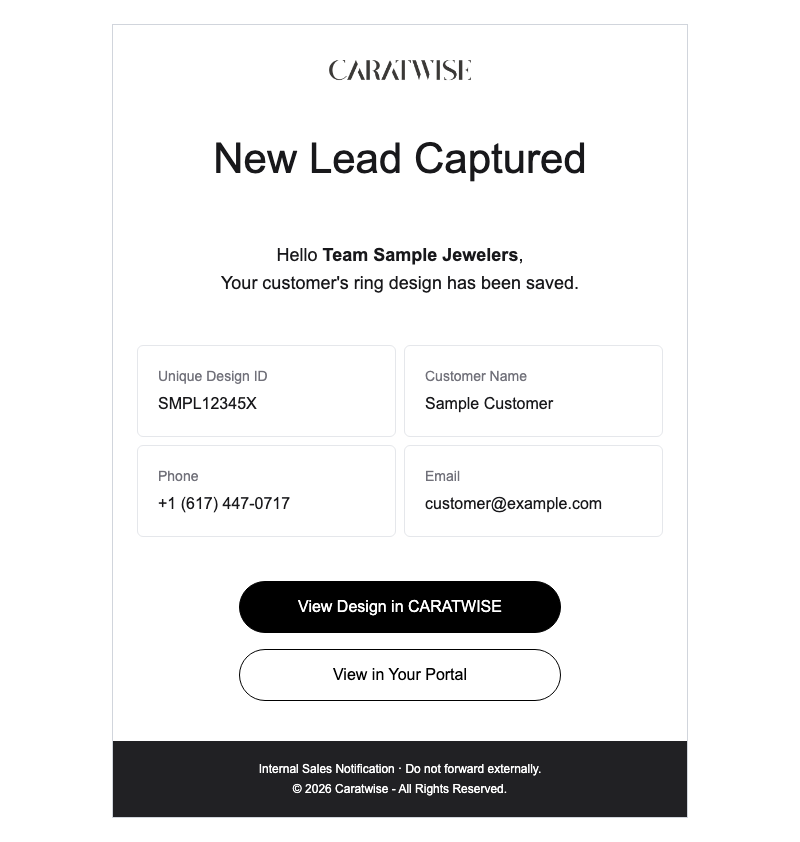
A sample. Yours shows your store’s name and the shopper’s real details.
| Item | Use it to |
|---|---|
| Unique Design ID | Open their exact design in the store. It’s 10 letters and numbers. |
| Customer name | Know who to ask for. |
| Phone number and email | Reach them. A call usually beats an email. |
| View Design in CARATWISE | See the setting, metal and diamond they chose. |
| View in Your Portal | Open the lead in your retailer portal, with all your saved designs. |
Follow up fast
Section titled “Follow up fast”- Call the same day, ideally within the hour.
- Lead with their design. Open View Design in CARATWISE first, then mention it: “I saw the oval halo you designed in yellow gold.”
- Invite them in. Offer two specific appointment times. No cost, no commitment.
- Open the design on the iPad before they arrive.
- No answer? Leave a short voicemail, follow up by text or email, and try again within a day or two.
If they buy online instead
Section titled “If they buy online instead”Some shoppers buy with Add to Cart (your website may use another label). Online orders reach Caratwise automatically and land with your in-store orders, so you don’t re-enter them.
Open the design in the store
Section titled “Open the design in the store”Anyone on your team can open a saved design.
- Open instore.caratwise.com.
- Tap the magnifying glass (top right), then the Saved Designs tab. Newest designs show first.
- Search by design ID (most reliable; names can be misspelled or shared) or customer name.
- Tap the design. It opens with all their choices selected.
- Make changes, tap Choose This Setting, choose the diamond and review the ring.
Saved designs never expire. You can change the diamond or setting alone. If their diamond has sold, it’s greyed out and similar stones are suggested.
Watch Pick up a saved design, or the short Find a saved design.
Questions? Email info@caratwise.com